# Purchasing Limit
| Platform | Account Type |
|---|---|
| Outlet | Manager | Orderer |
The purchasing limit is found only on the Outlet side of the platform and it can be applied per user.
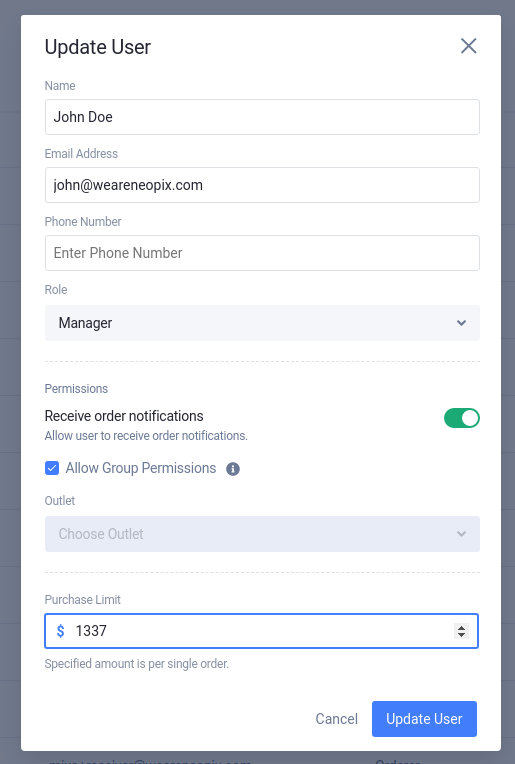
# How to configure?
A purchase limit is applied to a single user and can be found in the outlet users settings. It can only be applied to a Manager or Orderer user roles.
# How it works?
The limit will be applied per single order (per supplier). This means it won't apply to the whole cart, only for the single supplier } in that order.
For example, if our purchasing limit is to 500$ and inside the cart, we have two Suppliers.
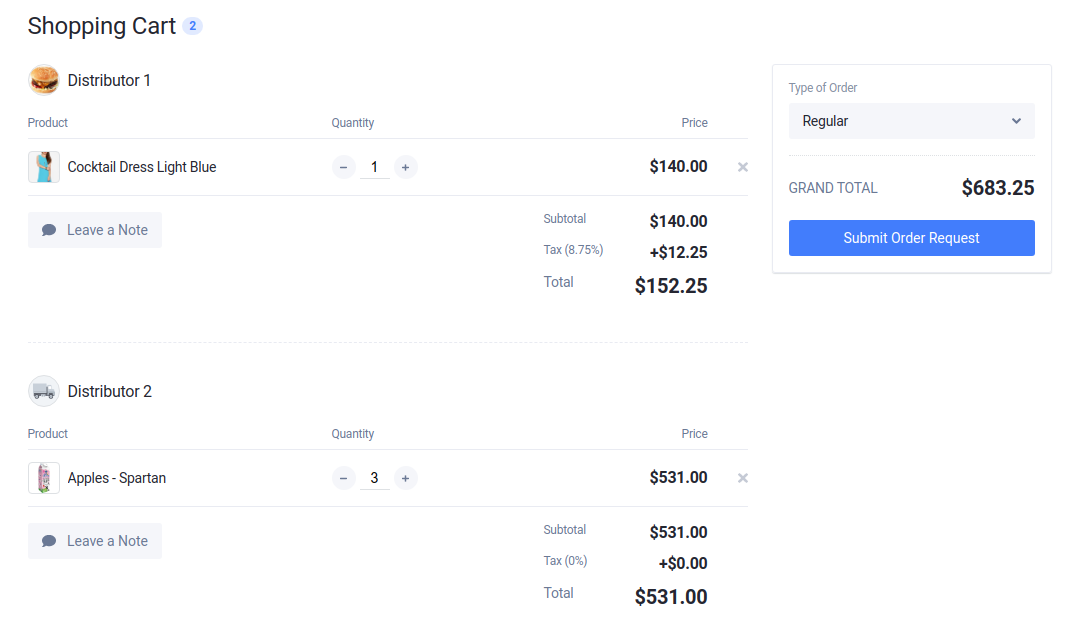
Because we have two suppliers in the cart this will create two separate orders. Therefore, the purchasing limit will apply per order (per supplier).
- The order for Supplier 1 won't be over the limit because the total price is below the limit (
500$). - The order for Supplier 2 will be over the limit because the total price is over the limit (
500$).
# Consequences
A user with a set purchasing limit can still create orders as before, the only difference if he crosses the purchasing limit it will have Need Approval status.
